

A fiber laser marking machine is usually purchased for a clear production purpose: marking serial numbers, logos, QR codes, nameplates, tools, hardware, electronic parts, or metal components that need stable identification. The machine may look simple from the outside, but the final marking result depends on material, laser power, lens size, fixture design, software settings, and the way the part is handled in production.
For buyers, the important question is not only “How much is a fiber laser marking machine?” A better question is: can this machine mark my actual parts clearly, repeatedly, and at the required production speed?
Before placing an order, the following details should be confirmed with the supplier. These points help avoid wrong configuration, unclear marks, slow production, unsuitable machine structure, or extra modification after delivery.
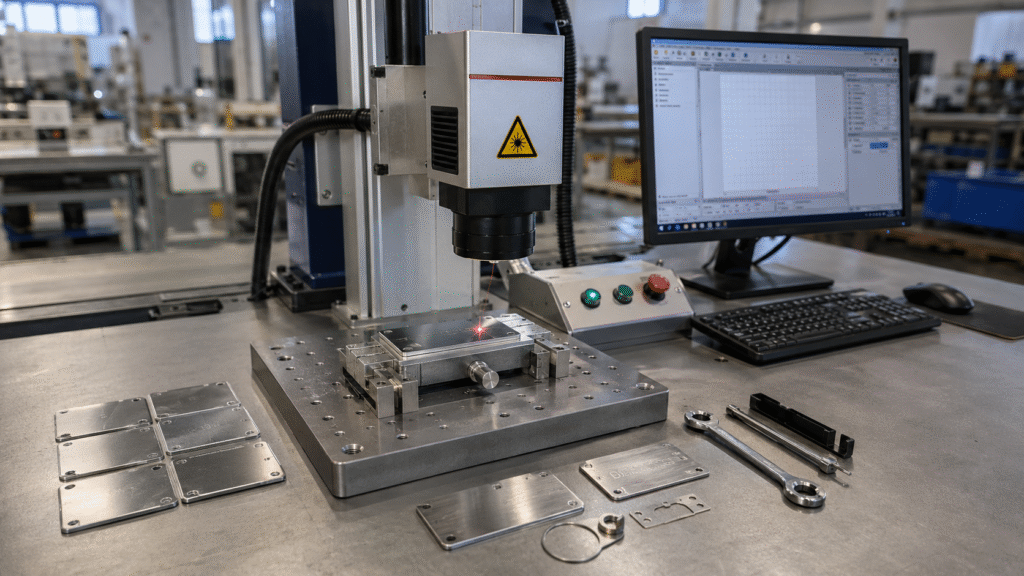
1. Material Type and Surface Condition
Fiber laser marking machines are widely used on metals such as stainless steel, carbon steel, aluminum, copper, brass, titanium, plated parts, tools, molds, bearings, hardware, nameplates, and precision components. They can also mark certain hard plastics, depending on the material composition and surface reaction.
Different materials do not produce the same marking effect. Stainless steel can usually achieve clear black or white marking. Aluminum may require adjusted parameters for better contrast. Copper and brass reflect more laser energy and may need higher power or slower marking. Coated, anodized, polished, painted, or plated surfaces also behave differently from raw metal.
Before choosing a machine, buyers should provide the exact material name, surface treatment, part photos, and expected marking effect. If the mark must resist abrasion, oil, heat, cleaning, outdoor exposure, or post-processing, this should be stated before sample testing.
For general metal part marking, a fiber laser marking machine is usually the first configuration to evaluate. The final choice should still be based on real material samples, not only on catalog specifications.
2. Marking Content and Readability Requirement
The marking content affects machine selection and parameter setup. A simple logo is different from a small QR code. A serial number is different from a deep engraved scale line. A decorative mark is different from a traceability code that must be scanned after months of use.
Buyers should confirm what will be marked, including text, logo, barcode, QR code, data matrix code, date code, batch number, scale mark, or custom graphic. The supplier also needs to know the required marking size, position, line width, contrast, and whether the code will be checked by a scanner or only inspected visually.
If the machine is used for product traceability, readability should be tested under real conditions. A QR code that looks clear on a test plate may still fail if it is too small, placed on a curved surface, polished after marking, or marked on a reflective material.
3. Laser Power Selection
Laser power should match the marking depth, material type, production speed, and batch volume. A higher-power machine is not automatically the better choice. It may increase speed or engraving depth, but it can also create more heat effect if the parameter setting is not suitable.
| Laser Power | Common Application | What to Confirm |
|---|---|---|
| 20W | Light surface marking, logos, serial numbers, small metal tags | Whether the speed and contrast are enough for daily production |
| 30W | General metal and hard plastic marking | Whether the machine can handle the required code size and batch quantity |
| 50W | Faster marking, deeper engraving, tools, hardware, molds, thicker metal parts | Whether deeper marking is required and whether the surface can accept more heat |
| 100W or higher | Heavy engraving and demanding industrial marking | Whether the full machine structure, lens, cooling, and safety design match the workload |
For most buyers, the correct way is to send sample parts and required marking content first. The supplier can then test whether 20W, 30W, 50W, or a higher-power configuration is more suitable. Selecting power only by price often leads to either insufficient marking performance or unnecessary cost.
4. Marking Area and Lens Size
The marking area is mainly determined by the F-theta lens. Common working areas include 110 × 110 mm, 150 × 150 mm, 175 × 175 mm, and larger sizes. A small lens usually provides finer marking precision, while a larger lens covers a bigger area but may reduce fine detail performance at the same marking conditions.
Buyers should confirm the actual marking size, not only the workpiece size. For example, a large metal plate may only need a small serial number in one corner. In that case, a large marking field may not be necessary. For panels, nameplates, packaging components, or multiple parts placed in one fixture, a larger field may be useful.
If the required mark must stay accurate across the full working area, the supplier should confirm the suitable lens, focusing distance, and fixture method before shipment.
Buyers comparing different models can review the laser marking machine category to understand available marking machine structures and configurations.
5. Standard Machine or Portable Machine
The machine structure should match how the workpiece is handled in production. A desktop or cabinet-type fiber laser marking machine is suitable for fixed workstations, small to medium parts, batch marking, and controlled workshop operation. It is easier to keep the part position stable and repeat the same marking process.
A portable structure is more practical when the part is too large, too heavy, or already installed on equipment. This may include machinery frames, large plates, molds, pipes, tanks, steel structures, or components that cannot be moved easily to a worktable.
If the marking task involves large or fixed workpieces, a portable laser marking machine may reduce handling time and make on-site marking easier. The buyer should still confirm focusing distance, positioning method, safety protection, and whether the portable head can be used steadily on the actual part.
6. Workpiece Shape, Height, and Fixture Design
Many marking problems are caused by unstable positioning rather than the laser source. If the part moves, tilts, or cannot stay at the correct focal distance, the mark may become unclear, distorted, or inconsistent.
Flat plates, round tubes, bearings, shafts, rings, tools, curved parts, and irregular castings may require different holding methods. For cylindrical parts, a rotary attachment may be needed. For repeated batch marking, a simple positioning fixture can improve efficiency and reduce operator mistakes.
Before ordering, buyers should provide the part size, weight, shape, marking position, and whether the part is flat, curved, round, or irregular. If the same mark will be repeated on thousands of parts, fixture design should be discussed together with the machine configuration.
7. Software Functions and File Compatibility
The software should match the buyer’s production workflow. Common marking tasks may require logos, vector files, QR codes, barcodes, serial numbers, date codes, batch numbers, or variable data. Buyers should confirm whether the software supports the required file formats and coding functions.
For standard marking, common formats such as DXF, PLT, AI, BMP, JPG, and similar files may be enough. For traceability applications, the buyer may need automatic serial number generation, date coding, QR code generation, barcode marking, or data import from an external file.
If the machine needs to connect with a production line, database, MES system, barcode scanner, or vision inspection system, this requirement should be confirmed before ordering. These functions may involve additional software, controller settings, or communication interface requirements.
8. Real Marking Speed, Not Only Catalog Speed
The marking speed shown in a catalog does not equal the real production speed. Actual output depends on loading time, focusing, fixture positioning, file setup, marking depth, marking content, and operator workflow.
For example, marking a small serial number on a stainless steel nameplate may take only a short time. Deep engraving on a steel tool, marking a dense QR code, or processing multiple parts in one fixture may require more time. If the mark needs several passes to reach the required depth, the real cycle time will increase.
Buyers should ask for a sample test or cycle time estimate based on real parts and real marking content. For batch production, output per hour is more useful than theoretical marking speed.
9. Core Components and Long-Term Stability
The quality of a fiber laser marking machine depends on more than the machine shell. The laser source, galvo scanner, F-theta lens, control board, power supply, lifting column, worktable, and electrical layout all affect daily use.
Buyers should confirm the laser source brand, warranty period, galvo performance, lens specification, controller type, and availability of spare parts. For overseas buyers, component replacement and remote troubleshooting are especially important. A low-cost configuration may look acceptable at the beginning, but it can become expensive if parts are difficult to replace later.
The supplier should also explain how to maintain the lens, clean the working area, back up software files, adjust focus, and restore parameters if the operator changes settings by mistake.
10. Workshop Environment and Power Supply
Fiber laser marking machines are relatively easy to maintain, but the working environment still matters. Dust, vibration, unstable voltage, high humidity, poor grounding, and high workshop temperature can affect marking stability and component life.
If the machine will be used near polishing, grinding, cutting, welding, or dusty production lines, buyers should consider dust protection and regular lens cleaning. If voltage is unstable, the supplier may recommend a voltage stabilizer or specific electrical protection.
Before shipment, confirm the local voltage, plug type, grounding condition, workshop temperature, and whether the machine will work in a clean room, general workshop, or heavy industrial environment.
11. Safety Protection and Operator Training
Laser marking requires proper safety control. Even when the machine is compact, reflected laser light can still be dangerous. Protective goggles, warning labels, emergency stop, safe focusing procedure, and operator training should be included in the discussion.
For factories with strict safety rules, an enclosed cabinet structure may be more suitable than an open desktop model. If the machine will be used by several operators, the supplier should provide clear operating instructions, training materials, and basic troubleshooting guidance.
Safety should be confirmed before production use, not after the machine arrives.
12. Sample Testing Before Final Configuration
Sample testing is the most reliable way to confirm whether the machine is suitable. Buyers should not rely only on standard sample photos, because those samples may not match the actual material, surface condition, code size, or production requirement.
A useful sample test should include the buyer’s real material, actual marking content, required mark size, target depth or contrast, and any post-treatment process. If the part will be cleaned, polished, coated, sterilized, heated, or exposed outdoors, the test should consider those conditions.
After testing, buyers should check whether the mark is readable, stable, properly positioned, and acceptable after handling. For QR codes or barcodes, scanning tests should be done instead of judging only by appearance.
13. Packing, Documentation, and After-Sales Support
For international orders, packing and support are part of the machine value. The buyer should confirm export packing, machine dimensions, gross weight, shipping method, voltage, software language, user manual, parameter guidance, training video, warranty scope, and spare parts supply.
Remote support is also important. The supplier should be able to guide installation, focusing, software setup, parameter adjustment, and common troubleshooting. If the buyer has no previous laser marking experience, this support can reduce the time needed to put the machine into production.
Information to Prepare Before Requesting a Quote
To receive a practical recommendation, buyers should prepare the following information before contacting the supplier:
- Material type, grade, and surface treatment
- Photos or samples of the actual parts
- Marking content, such as logo, serial number, QR code, barcode, or text
- Required marking size, position, depth, and contrast
- Whether the mark needs to resist abrasion, oil, heat, cleaning, or outdoor exposure
- Workpiece size, weight, height, and shape
- Daily or monthly marking quantity
- Required production speed or cycle time
- Need for rotary marking, fixture, portable operation, or enclosed structure
- Local voltage, workshop environment, and destination country
Final Thoughts
A fiber laser marking machine should be selected according to actual parts and production requirements, not only by laser power or machine price. Material reaction, marking content, lens size, fixture design, software function, sample testing, safety protection, and after-sales support all affect the final result.
MADE Laser supplies industrial laser equipment for marking, cutting, and welding applications. Buyers can review the fiber laser marking machine, compare related laser marking machine options, or check additional equipment such as laser cutting machines and laser welding machines for broader production needs.
To request a suitable configuration, please provide your material, marking content, workpiece size, required marking effect, production quantity, and destination country. MADE Laser can evaluate the marking requirement and recommend a machine configuration based on actual application conditions.