

Choosing a laser marking machine for metal is not only a matter of wattage. Stainless steel, carbon steel, aluminum, brass, copper, titanium, and coated metal parts all respond differently to laser energy. A 20W fiber laser may mark a stainless steel tag clearly, but the same setup may be too slow for deep engraving on hardened steel or unstable for QR codes on raw aluminum.
For industrial buyers, the right machine should be selected by material, surface finish, marking effect, code readability, production speed, fixture method, and long-term repeatability. A good fiber laser marking machine for metal should not only create a visible mark; it should produce a mark that remains readable and consistent in real factory conditions.
This article explains how to choose the right fiber laser for steel, aluminum, stainless steel, brass, copper, and other metal parts. It also covers common selection mistakes, power choices, sample testing, and practical buyer scenarios.
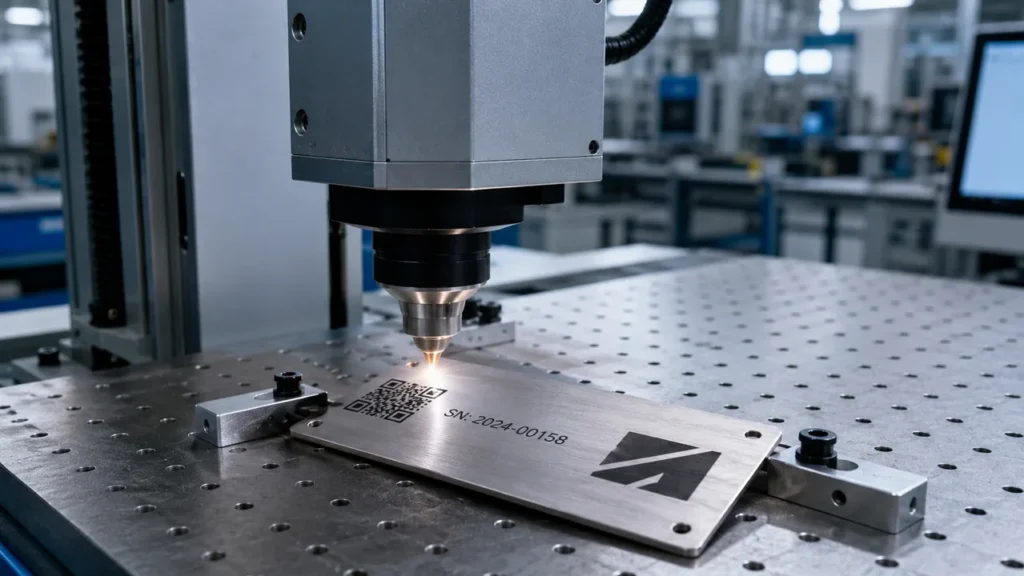
Why Fiber Laser Is Usually the First Choice for Metal Marking
For most industrial metal marking work, a fiber laser marking machine is the first option to evaluate. Fiber lasers are widely used for permanent marking on stainless steel, carbon steel, aluminum, brass, copper, titanium, coated metals, and many alloy parts.
Typical metal marking applications include:
- Logos and product branding on metal parts
- Serial numbers and batch codes
- QR codes and Data Matrix codes for traceability
- Tool identification and anti-counterfeit marks
- Nameplates, rating plates, and equipment tags
- Scale lines and measurement marks
- Deep engraving on tools, molds, and mechanical components
Compared with ink printing, labels, or mechanical engraving, laser marking offers permanent identification without consumables. However, the final result depends heavily on the metal type, surface condition, laser power, focus accuracy, lens field, and marking parameters.
Quick Metal Marking Effect Comparison
The table below gives a practical starting point for buyers comparing a metal laser marking machine. It does not replace sample testing, but it helps identify which materials are easier, which need more careful parameter control, and which may require higher power.
| Metal Material | Best Marking Effect | Common Power Range | Risk Level | Buyer Notes |
|---|---|---|---|---|
| Stainless Steel | Black marking, logo, serial number, QR code, light engraving | 20W–50W | Low to Medium | Very common for fiber laser marking. Surface finish affects black mark quality. |
| Carbon Steel | Logo, tool ID, part number, deep engraving | 20W–100W | Low to Medium | Check rust, oil, scale, and required engraving depth before selection. |
| Anodized Aluminum | High-contrast logo, QR code, nameplate marking | 20W–30W | Low | Usually easier than raw aluminum, but different anodized colors should be tested. |
| Raw Aluminum | Gray mark, serial number, QR code after testing | 30W–50W | Medium | High thermal conductivity can reduce contrast. Real part testing is important. |
| Brass | Logo, serial number, decorative mark, surface engraving | 30W–50W | Medium | Usually easier than copper, but polished or plated brass needs testing. |
| Copper | Terminal ID, busbar marking, serial number, part traceability | 50W+ | High | Reflectivity and heat conductivity make copper more demanding than steel. |
| Titanium | Medical parts, aerospace components, color or identification marks | 20W–50W | Medium | Process validation and surface cleanliness are important. |
The key point is simple: a laser marker for metal should be selected by the required mark effect, not only by material name. “Aluminum” can mean raw aluminum, anodized aluminum, painted aluminum, or polished aluminum. Each may need different parameters.
How to Choose Laser Power for Metal Parts
Many buyers compare 20W fiber laser marking machine, 30W fiber laser marking machine, 50W fiber laser marking machine, and 100W systems before requesting a quote. This is reasonable, but power alone does not decide whether a machine is suitable.
Higher power can improve speed and engraving depth, but it can also create heat marks, rough edges, or poor contrast if the parameters are wrong. A lower-power machine may be enough for light marking, while a higher-power machine may be required for deep engraving or difficult reflective metals.
| Laser Power | Suitable Metal Marking Use | Typical Buyer Scenario | What to Confirm |
|---|---|---|---|
| 20W Fiber Laser | Light marking, logos, serial numbers, small text, simple QR codes | Stainless tags, nameplates, small hardware parts | Check contrast, speed, and minimum character size. |
| 30W Fiber Laser | General metal marking with better speed and wider coverage | Steel tools, aluminum plates, brass fittings, batch marking | Good balance for many factories; still test real parts. |
| 50W Fiber Laser | Faster marking, stronger contrast, moderate engraving, reflective metals | Automotive aluminum housings, brass valves, copper terminals, higher output | Check heat effect, edge quality, and QR code readability. |
| 100W Fiber Laser | Deep engraving, heavy-duty marking, high-throughput production | Molds, tools, thick steel parts, demanding industrial marking | Choose only when depth or productivity justifies the higher investment. |
For basic stainless steel or steel identification, 20W or 30W may be enough. For aluminum housings, reflective metal parts, faster production, or moderate engraving, 50W may be more practical. For deep engraving on tools, molds, and hardened steel, 100W may be evaluated after cycle-time testing.
Choosing a Laser Marking Machine for Stainless Steel
A laser marking machine for stainless steel is widely used in medical tools, kitchenware, machinery, nameplates, electronics, valves, hardware, and automotive parts. Stainless steel is one of the most common materials for fiber laser marking because it can produce clear surface marks, black marks, serial numbers, QR codes, and logos.
Common stainless steel marking effects include:
- Black marking for high visual contrast
- Light gray marking for product identification
- Serial numbers and batch codes
- QR codes and Data Matrix codes
- Logos and brand marks
- Scale lines and technical symbols
- Moderate engraving for durable identification
When selecting a stainless steel laser marking machine, buyers should check the surface finish first. Brushed stainless steel, polished stainless steel, bead-blasted stainless steel, and oily machined stainless steel may need different laser parameters.
For black marking, heat control is important. A good black mark should be dark and readable without unnecessary surface damage. If the part will be cleaned, rubbed, sterilized, or exposed to outdoor conditions, the sample test should simulate those conditions rather than only checking a fresh mark.
Stainless Steel Buyer Checks
- Should the mark be black, gray, engraved, or only visible?
- Will the part be polished, washed, sterilized, or exposed to friction?
- What is the minimum character height?
- Is the marking area flat, curved, or narrow?
- Must the QR code be readable by a fixed industrial scanner?
- Does the mark need to meet traceability or quality-control requirements?
Choosing a Laser Marking Machine for Aluminum
An aluminum laser marking machine is often used for automotive parts, electronics housings, anodized panels, industrial nameplates, aerospace components, hardware, and machinery parts. Aluminum is lightweight and common, but it needs careful testing because surface treatment changes the marking result.
Raw aluminum, anodized aluminum, painted aluminum, and polished aluminum do not behave the same way. Anodized aluminum can often provide strong contrast. Raw aluminum may produce a lighter gray mark and may require more careful parameter control.
| Aluminum Surface | Typical Marking Result | Main Risk | Recommended Test |
|---|---|---|---|
| Raw Aluminum | Gray or light surface mark | Low contrast or inconsistent appearance | Test focus, speed, power, cleaning condition, and scanner readability. |
| Anodized Aluminum | Clear high-contrast mark | Different anodized colors and coating thicknesses respond differently | Test every color and finish used in production. |
| Painted Aluminum | Layer removal or color contrast | Burned coating, rough edge, smoke residue | Check edge quality and coating stability after marking. |
| Polished Aluminum | Visible mark with controlled parameters | Reflection and unstable contrast under different lighting | Test under actual factory lighting and scanner angle. |
For automotive aluminum housings or electronic enclosures, the mark is often used for traceability. In that case, buyers should not only check whether the code looks clear. They should verify whether it scans after cleaning, handling, assembly, and packaging.
Choosing a Laser Marking Machine for Steel Parts
A laser marking machine for steel is commonly used for tools, molds, machine parts, brackets, blades, bearings, fasteners, structural components, and equipment tags. Carbon steel and tool steel usually respond well to fiber laser marking, but the required marking depth can change the machine choice.
For carbon steel tools and molds, buyers should compare surface marking and deep engraving separately. A shallow logo or part number may only require 20W–30W. Repeated deep engraving on hardened steel usually requires higher power and longer cycle-time testing.
Surface condition is also important. Oil, rust, oxide scale, heat-treatment residue, cutting fluid, and protective coatings can affect marking contrast. A clean flat sample may mark well, while the actual production part may produce a different result.
Common Steel Marking Applications
- Tool identification on wrenches, cutters, drill bits, and blades
- Batch numbers on machined steel components
- Brand logos on hardware products
- Deep engraving on molds and dies
- Scale lines on measuring tools
- Part numbers and QR codes on brackets and assemblies
- Anti-counterfeit marks on industrial products
For steel deep engraving, cycle time is often the deciding factor. A low-power machine may eventually reach the required depth with many passes, but it may be too slow for production. Buyers should calculate marking time per part before confirming the power level.
Brass and Copper: Reflective Metals Need More Careful Testing
Brass and copper can be marked with fiber laser, but they require more careful testing than ordinary steel. These materials reflect more laser energy and conduct heat quickly, so the marking process must be controlled more precisely.
Brass is usually easier to mark than pure copper. It is commonly used for valves, fittings, locks, hinges, plaques, nameplates, medals, jewelry, and decorative hardware. A 30W or 50W fiber laser may be considered depending on contrast, marking area, depth, and production speed.
Copper is more demanding because of high reflectivity and fast heat dissipation. Common copper marking applications include busbars, terminals, connectors, battery components, HVAC fittings, and conductive parts. For copper, the buyer should test both mark visibility and production cycle time before choosing the power level.
For reflective metal applications such as brass, copper, bronze, polished aluminum, and plated parts, this related article on fiber laser marking brass, copper, and other reflective metals gives a deeper explanation of material behavior and testing points.
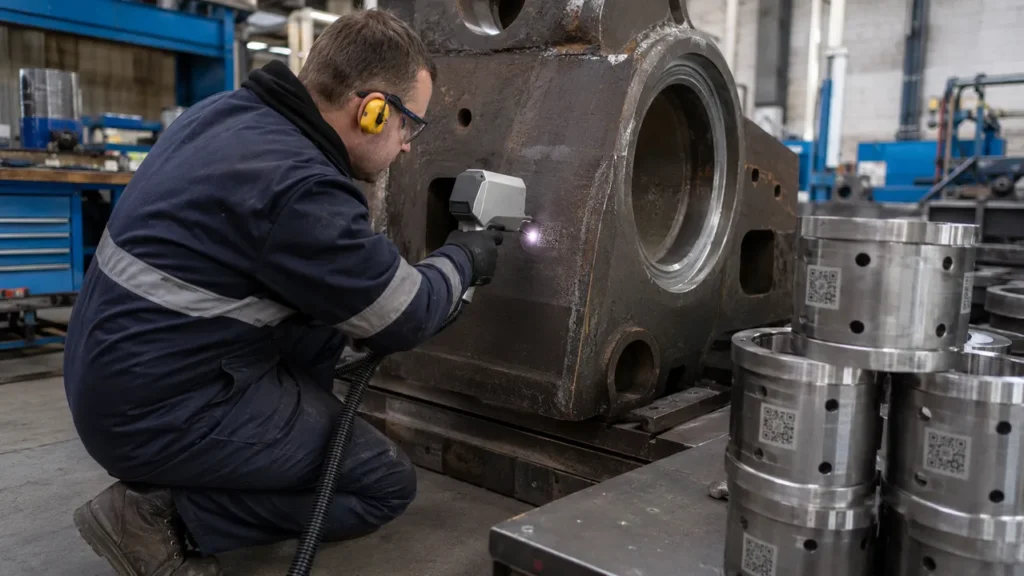
Machine Structure: Standard, Portable, Enclosed or Automated?
The right machine structure depends on part size, handling method, safety requirements, and production volume. A small stainless tag and a large steel frame should not be handled in the same way.
| Machine Structure | Best Use | Metal Part Examples | Selection Notes |
|---|---|---|---|
| Standard Workstation | Regular batch marking on small and medium parts | Nameplates, tools, electronics housings, small machined parts | Good for repeatable focusing, positioning, and daily factory use. |
| Portable / Handheld Unit | Large, heavy, or fixed metal parts | Molds, pipes, steel structures, machinery frames, maintenance parts | Useful when moving the part is difficult or expensive. |
| Enclosed Workstation | Higher safety and cleaner workflow | Medical parts, electronics, automotive components, precision parts | Recommended when operator safety, smoke control, and process consistency matter. |
| Automated Marking System | High-volume production and traceability | Aluminum housings, steel brackets, terminals, production-line components | May include conveyor, vision positioning, PLC, MES, or barcode database. |
A standard laser marking machine is suitable for workshops that mark repeated batches of small and medium metal parts. It provides better positioning and fixture consistency than manual handheld marking.
A portable laser marking machine is more suitable when the metal part is too large, heavy, or fixed in place. This can include molds, steel structures, large pipes, machinery frames, and maintenance parts. A handheld laser marking machine for metal should be chosen for workflow reasons, not simply because it looks more flexible.
Marking Content: Logo, Serial Number, QR Code or Deep Engraving?
Different marking content requires different settings and sometimes different hardware choices. A logo on a flat steel plate is easier than a small QR code on a curved aluminum housing. A shallow serial number is different from deep engraving on a hardened tool.
| Marking Content | Technical Requirement | Common Buyer Mistake | What to Test |
|---|---|---|---|
| Logo | Clear edge, correct size, stable contrast | Only checking one sample surface | Test different surface finishes and part batches. |
| Serial Number | Readable small text, automatic numbering, consistent position | Ignoring software workflow and operator errors | Test automatic serial number generation and file switching. |
| QR Code / Data Matrix | Scannable contrast, correct cell size, stable texture | Assuming a visible code is automatically scannable | Use the same scanner and lighting as production. |
| Deep Engraving | Depth, edge quality, cycle time, heat control | Choosing low power without checking speed | Measure depth and marking time per part. |
| Black Marking | Heat control and surface reaction | Expecting the same black effect on every stainless surface | Test brushed, polished, and machined surfaces separately. |
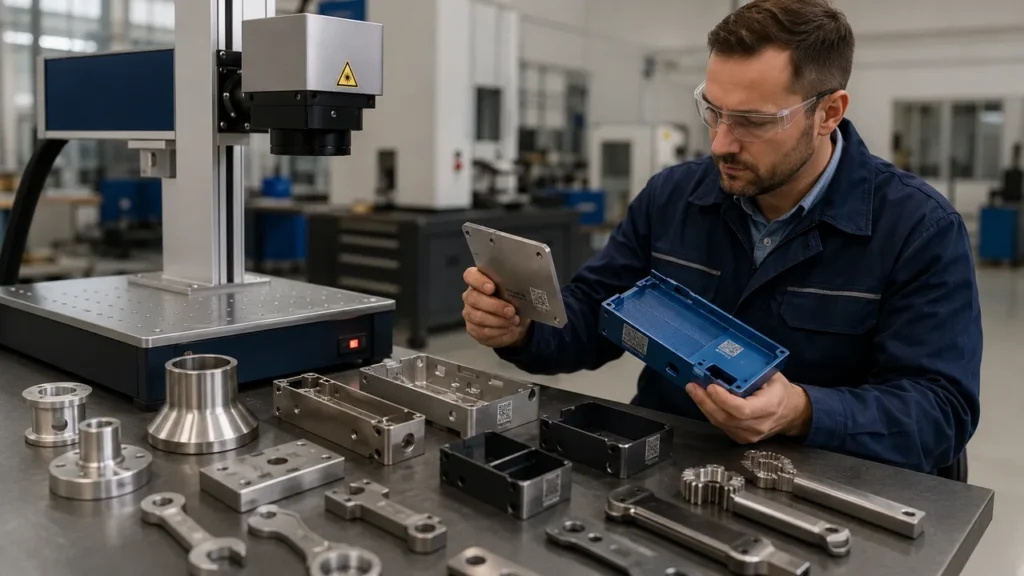
For industrial traceability, mark readability is more important than visual appearance. A QR code may look acceptable in a photo but fail under a fixed scanner on the production line. For deeper information on this topic, see this article about fiber laser marking for metal part traceability.
Lens Field Size and Focus Accuracy
The marking field affects both marking area and detail quality. Buyers sometimes ask for the largest possible marking area, but a larger field is not always better. If the part requires tiny text, compact QR codes, or fine logos, a smaller field may provide better detail and energy density.
Before confirming the machine, check:
- Maximum marking area
- Minimum character height
- QR code or Data Matrix code size
- Part height and working distance
- Flat, curved, round, or irregular surface
- Whether a rotary device is needed
- Whether the operator can focus quickly and repeatably
For rings, pipes, round tools, brass fittings, and cylindrical parts, a rotary device may be required. For irregular metal parts, a custom fixture may be more important than increasing laser power.
Software Functions Industrial Buyers Should Confirm
For metal marking, software capability affects daily production efficiency. A machine used only for logos has different requirements from a system used for changing serial numbers, QR codes, production dates, and traceability data.
Before choosing a machine, confirm whether the software supports:
- Automatic serial number generation
- Production date and batch code marking
- Barcode, QR code, and Data Matrix code creation
- DXF, PLT, AI, BMP, JPG, and other common file imports
- Rotary marking for cylindrical metal parts
- Flying marking for moving products or production lines
- Parameter saving for different materials
- Operator-friendly file switching and preview
If the factory marks several materials every day, parameter management becomes important. Stainless steel, raw aluminum, anodized aluminum, brass, copper, and tool steel may each require a different saved parameter group.
Common Mistakes When Choosing a Laser Marking Machine for Metal
1. Choosing Only by Wattage
A 50W machine is not automatically better than a 30W machine if the scanner, lens, fixture, software, and focusing method are not suitable. Power matters, but the complete system matters more.
2. Assuming All Metals Mark the Same
Stainless steel, carbon steel, aluminum, brass, and copper have different absorption, reflectivity, and heat behavior. Even the same material can behave differently if it is polished, coated, anodized, oxidized, or oily.
3. Ignoring Surface Finish
A brushed stainless steel panel, a polished stainless steel tool, and an oily machined part may require different settings. Surface condition should be included in sample testing.
4. Not Testing QR Code Readability
For traceability, a QR code must scan reliably. Buyers should test with the same scanner, lighting, angle, and surface condition used in production.
5. Buying a Portable Machine for Parts That Need Fixture Accuracy
A portable laser marking machine for metal is useful for large or fixed parts. For small parts that need repeatable positioning, a standard workstation with fixtures may be more efficient.
6. Ignoring Safety and Smoke Control
Metal marking can create reflected laser risk, smoke, dust, and fumes depending on the material and coating. Enclosures, goggles, interlocks, and extraction should be considered for factory use.
Realistic Industry Scenarios
Automotive Aluminum Housing Supplier
An automotive supplier needs QR codes and part numbers on aluminum housings. The codes must remain readable after handling, cleaning, and assembly. A 30W machine may be enough for some anodized parts, but raw aluminum or faster production may require comparison with a 50W system. The buyer should verify scanner readability under real line conditions.
Stainless Steel Medical Tool Manufacturer
A medical tool manufacturer needs small text, logos, and identification codes on stainless steel instruments. The mark must be clean, precise, and resistant to cleaning. A laser marking machine for stainless steel should be tested for black mark quality, small character clarity, surface finish impact, and post-cleaning readability.
Brass Valve and Fittings Factory
A brass valve manufacturer needs logos, pressure ratings, and batch numbers on polished or machined brass fittings. Brass can usually be marked by fiber laser, but polished and plated surfaces should be tested separately. A 30W or 50W fiber laser may be compared based on contrast and marking speed.
Copper Terminal and Busbar Manufacturer
A copper terminal factory needs part IDs and serial numbers on conductive components. Copper is more reflective and conducts heat quickly, so the process window is narrower. A 50W or higher-power fiber laser may be evaluated, but sample testing should confirm both mark visibility and production cycle time.
Metal Nameplate Workshop
A nameplate workshop marks stainless steel, aluminum, brass, and coated plates in small batches. The buyer may need flexible parameter storage, a stable standard workstation, and multiple lens or fixture options. The best machine is not necessarily the highest power; it is the one that can switch between materials efficiently.
Sample Testing: The Most Important Step Before Ordering
For industrial metal marking, sample testing is more reliable than general material claims. A proper sample test should prove that the mark meets real production requirements, not only that the laser can leave a visible mark.
Before sending samples, prepare the following information:
- Metal type and alloy grade, if available
- Surface condition: raw, polished, brushed, anodized, plated, coated, oxidized, or oily
- Part photos, drawings, and dimensions
- Marking content: logo, text, serial number, QR code, Data Matrix code, or scale line
- Required marking size and position
- Required depth, contrast, or black marking effect
- Target cycle time per part
- Expected production volume per day
- Durability test: rubbing, cleaning, oil, heat, outdoor exposure, or corrosion
- Manual, batch, portable, or automated marking requirement
When reviewing sample results, check:
- Is the mark readable under normal factory lighting?
- Does the QR code scan reliably?
- Is the mark position repeatable?
- Does the surface show unwanted heat damage?
- Is the cycle time acceptable for production?
- Can operators repeat the result without difficult adjustments?
Buyer Checklist for Metal Laser Marking Machine Selection
| Selection Item | What to Confirm |
|---|---|
| Material Range | Steel, stainless steel, aluminum, brass, copper, titanium, coated metals, or mixed materials |
| Marking Effect | Surface marking, black marking, deep engraving, QR code, logo, or serial number |
| Laser Power | 20W, 30W, 50W, or 100W based on sample testing and cycle time |
| Machine Structure | Standard workstation, portable unit, enclosed workstation, or automated system |
| Lens and Field Size | Marking area, fine detail, character size, QR code size, and working distance |
| Fixture | Flat part fixture, rotary device, custom jig, or vision positioning |
| Software | Serial number, date code, barcode, QR code, file import, rotary marking, and flying marking |
| Safety | Protective goggles, enclosure, interlock, smoke extraction, and reflected beam control |
| Support | Sample testing, training, parameter setup, spare parts, warranty, and technical support |
Conclusion: Choose by Metal, Marking Effect and Production Workflow
A laser marking machine for metal should be selected by real production requirements, not only by price or laser power. Stainless steel, carbon steel, aluminum, brass, copper, and titanium can all be marked by fiber laser, but they require different parameter windows, fixture methods, and sometimes different power levels.
For basic stainless steel or steel part marking, a 20W or 30W fiber laser may be suitable. For aluminum housings, reflective metals, faster output, or moderate engraving, a 50W fiber laser marking machine may be more practical. For deep engraving and heavy-duty production, higher power can be evaluated after sample testing.
The safest selection process is to define the material, define the marking effect, test real parts, verify code readability, calculate cycle time, and compare complete configurations. A good metal laser marking system should provide clear marks, stable repeatability, practical operator workflow, and long-term reliability in factory conditions.
FAQ: Laser Marking Machine for Metal
1. What type of laser marking machine is best for metal?
Fiber laser is usually the first choice for metal marking because it works well on stainless steel, carbon steel, aluminum, brass, copper, titanium, and many alloys. The final configuration should be selected according to material, surface finish, marking effect, speed, and depth requirements.
2. Can fiber laser mark all metals?
Fiber laser can mark many metals, including stainless steel, carbon steel, aluminum, brass, copper, titanium, and coated metals. However, reflective metals such as copper and polished aluminum need more careful testing than ordinary steel.
3. What is the best laser power for stainless steel marking?
20W or 30W is often enough for light marking, serial numbers, logos, and small text on stainless steel. 50W may be considered when faster marking, stronger contrast, moderate engraving, or higher production volume is required.
4. Is 30W enough for aluminum laser marking?
30W may be enough for many aluminum marking tasks, especially anodized aluminum. Raw aluminum, polished aluminum, larger marks, faster production, or QR code traceability may require comparison with 50W after sample testing.
5. Why is copper harder to laser mark than steel?
Copper reflects more laser energy and conducts heat faster than steel. This can reduce mark contrast and make the process window narrower. Copper marking should be tested with real parts before choosing the machine power.
6. Do I need a portable laser marking machine for metal?
A portable or handheld laser marking machine is useful when the metal part is too large, heavy, or fixed in place. For small and repeatable parts, a standard workstation with proper fixtures may provide better positioning and efficiency.
7. Why is sample testing important before buying?
Metal marking results depend on alloy, coating, surface finish, oil, oxidation, required depth, cycle time, and code readability. Sample testing confirms whether the machine can meet real production requirements, not only produce a visible mark.