

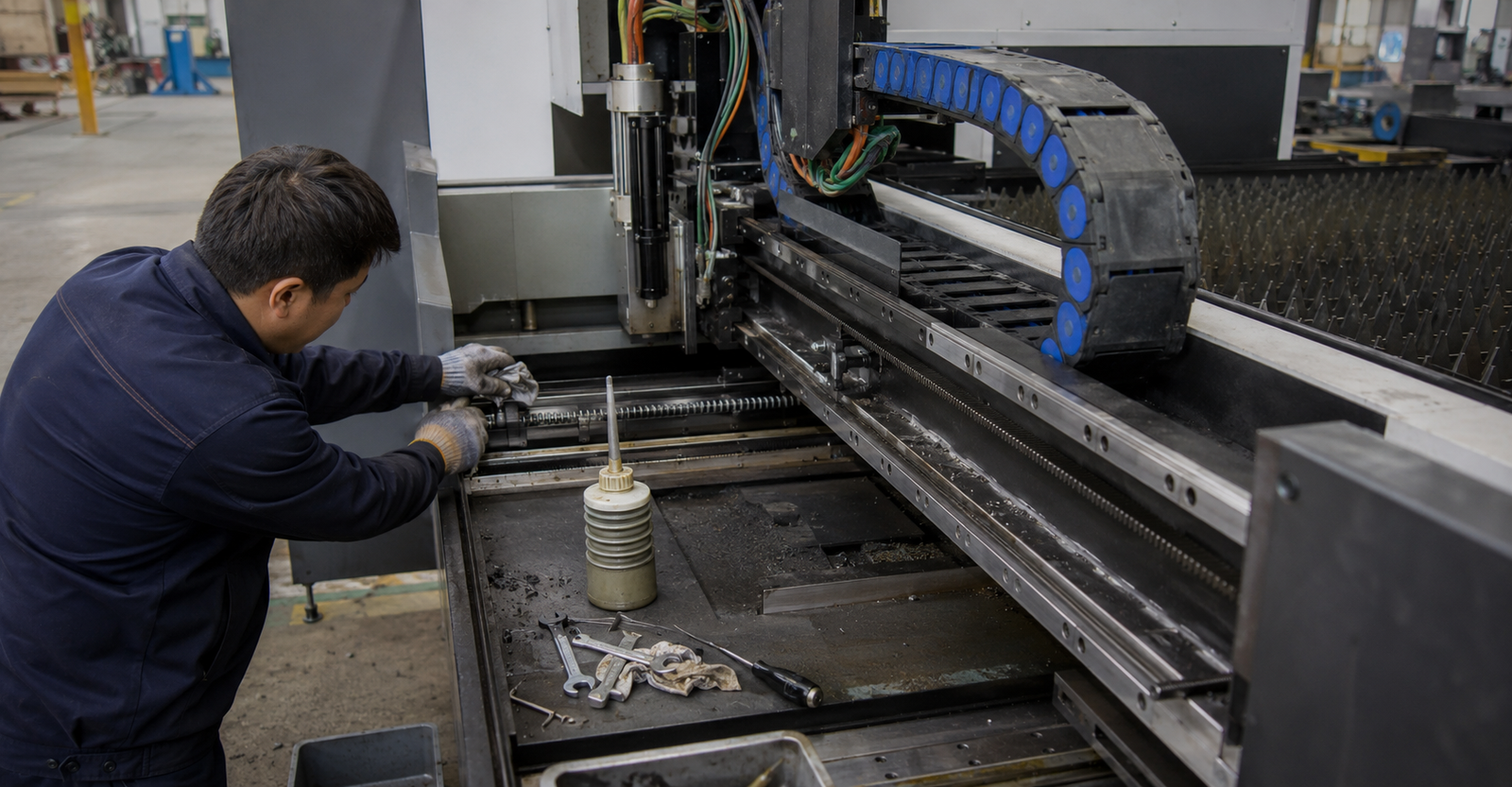
A fiber laser cutting machine may operate for many hours every day in a demanding metal fabrication environment. Metal dust, unstable air pressure, contaminated cooling water and worn consumables can gradually affect cutting quality and eventually cause unexpected equipment failure.
For factory technicians, effective maintenance is not only about repairing the machine after an alarm occurs. A structured preventive maintenance plan can help identify small problems before they interrupt production.
This guide explains the daily, weekly and periodic maintenance tasks that can help factories reduce downtime, protect critical components and maintain stable cutting performance.
Why Preventive Maintenance Matters
A fiber laser cutting system includes several interconnected components:
- Laser source
- Cutting head
- Protective lenses and nozzles
- Water chiller
- Motion and transmission system
- Gas supply system
- Electrical cabinet
- Dust extraction system
- CNC control system
A problem in one component can affect the entire cutting process. For example, a contaminated protective lens may cause unstable cutting, while insufficient cooling may trigger a laser source alarm.
Routine inspection helps technicians discover these problems early and prevents minor issues from developing into expensive failures.
Daily Fiber Laser Cutting Machine Maintenance
Daily checks should be completed before starting production and after the machine has finished operating.
1. Check the Cutting Head
Inspect the cutting head for dust, oil, metal particles or signs of impact.
Pay particular attention to:
- Protective lens condition
- Nozzle cleanliness
- Ceramic ring condition
- Nozzle alignment
- Cutting head cable connections
- Height-sensing performance
A dirty or damaged protective lens can reduce laser transmission and increase internal temperature. Replace the lens immediately if technicians find burns, scratches, haze or contamination.
Avoid touching optical surfaces directly with bare hands.
2. Inspect the Nozzle
The nozzle should remain round, clean and correctly centered with the laser beam.
A damaged or blocked nozzle can cause:
- Uneven gas flow
- Excessive slag
- Poor edge quality
- Unstable piercing
- Frequent cutting interruption
Remove metal deposits carefully and replace the nozzle when deformation or severe wear is visible.
3. Check Cooling Water Temperature
Confirm that the water chiller is operating within the temperature range recommended by the machine manufacturer.
Technicians should check:
- Water temperature
- Water level
- Chiller alarm status
- Water flow
- Hose connections
- Leakage around fittings
Do not continue operating the machine if the chiller produces a low-flow or high-temperature alarm. Insufficient cooling may affect both the laser source and cutting head.
4. Check Assist Gas Pressure
Verify that oxygen, nitrogen or compressed-air pressure is stable before cutting.
Inspect the following:
- Gas regulator
- Pressure gauge
- Pipeline connections
- Solenoid valves
- Air filter
- Gas leakage
Low or fluctuating pressure may produce incomplete cuts, heavy slag or unstable cutting edges.
Compressed air should be dry, clean and free from oil. Moisture or oil entering the cutting head can contaminate optical components.
5. Clean the Work Area
Remove metal scraps, slag and dust from the cutting table and surrounding area.
Accumulated waste can:
- Obstruct table movement
- Increase fire risk
- Affect dust extraction
- Damage cables and hoses
- Make maintenance more difficult
6. Check for Abnormal Sounds
Listen for unusual noise during machine movement.
Possible warning signs include:
- Grinding sounds
- Repeated vibration
- Sudden impact noise
- Irregular motor sound
- Air leakage
- Chiller pump noise
Abnormal sounds should be investigated before continuous production resumes.
Weekly Maintenance Tasks
Weekly maintenance should focus on cleaning, lubrication and component condition.
Clean the Guide Rails and Rack System
Remove dust and metal particles from the guide rails, racks and transmission areas.
Apply the lubricant specified by the machine manufacturer. Excessive lubricant should also be avoided because it can attract dust and contamination.
Check for:
- Uneven movement
- Dry guide rails
- Loose fasteners
- Damaged protective covers
- Abnormal wear
- Accumulated metal dust
Inspect the Dust Extraction System
Check the dust collector, extraction pipes and filter elements.
Poor extraction performance may allow smoke and dust to enter sensitive mechanical or electrical areas.
Technicians should clean or replace filters when airflow becomes noticeably weaker.
Drain the Air System
Drain moisture from:
- Air compressor tank
- Air dryer
- Oil-water separator
- Air filter
Water or oil in compressed air is a common cause of optical contamination and unstable cutting performance.
Inspect Cables and Hoses
Check electrical cables, gas hoses and cooling-water pipes for:
- Abrasion
- Cracks
- Loose connectors
- Sharp bends
- Leakage
- Damage inside cable carriers
Moving cables should travel smoothly without being stretched, twisted or trapped.
Clean the Control Cabinet
Ensure that the electrical cabinet ventilation system is working correctly.
Clean external air filters and inspect cooling fans. Do not use uncontrolled high-pressure air inside the cabinet because it may push dust deeper into electrical components.
Monthly and Periodic Maintenance
The exact maintenance interval should follow the machine manual, production workload and workshop conditions.
Replace or Test Cooling Water
Cooling water quality directly affects the laser source and chiller system.
Use the water type recommended by the manufacturer. Do not use untreated tap water or mineral water unless the equipment instructions specifically permit it.
Inspect the water for:
- Discoloration
- Sediment
- Biological contamination
- Reduced flow
- Unusual odor
Cooling-water replacement may need to be more frequent in hot, dusty or heavily used workshops.
Check Machine Accuracy
Technicians should periodically verify:
- Cutting head verticality
- Nozzle centering
- Focus position
- Cutting dimensions
- Diagonal accuracy
- Repeat positioning
- Exchange-table positioning
Test parts can help identify gradual changes in machine accuracy before they affect customer orders.
Inspect the Electrical System
Qualified technicians should check:
- Terminal tightness
- Grounding condition
- Fan operation
- Electrical cabinet temperature
- Servo connections
- Sensor wiring
- Warning indicators
Always disconnect and isolate power before opening or servicing electrical equipment.
Check the Machine Bed and Support Slats
Inspect the cutting bed for deformation, heavy slag buildup and damaged support slats.
Severely damaged slats may cause sheets to sit unevenly, affecting focus distance and cutting consistency.
Replace damaged slats before they begin interfering with normal loading or cutting.
Common Warning Signs of Maintenance Problems
Technicians should investigate the machine when any of the following symptoms appear:
| Warning Sign | Possible Cause |
|---|---|
| Increasing slag on cut edges | Worn nozzle, incorrect focus, low gas pressure or dirty lens |
| Incomplete cutting | Insufficient power, unstable gas supply or incorrect parameters |
| Frequent cutting-head alarms | Dirty sensor, damaged ceramic ring or unstable height control |
| Chiller temperature alarm | Low water level, blocked filter, poor ventilation or pump issue |
| Uneven cutting dimensions | Transmission wear, loose components or calibration error |
| Excessive smoke around the machine | Blocked extraction pipe or saturated dust filter |
| Repeated lens contamination | Poor compressed-air quality, leakage or incorrect lens handling |
| Abnormal movement noise | Insufficient lubrication, debris or worn transmission components |
Operators should not repeatedly restart the machine without identifying the cause of an alarm. Doing so may turn a minor issue into a more serious component failure.
Spare Parts Factories Should Keep in Stock
Keeping essential consumables on site can reduce downtime when a component needs replacement.
A practical spare-parts inventory may include:
- Protective lenses
- Cutting nozzles
- Ceramic rings
- Sealing rings
- Air and gas filters
- Chiller filters
- Lubricant
- Cleaning swabs and optical cleaning materials
- Common sensors
- Frequently used electrical components
The exact list should be based on the machine model, laser power, cutting materials and daily operating hours.
Create a Maintenance Record
Every factory should maintain a simple maintenance log.
Record:
- Inspection date
- Machine operating hours
- Alarm messages
- Consumables replaced
- Water-chiller condition
- Gas-pressure readings
- Cutting-quality problems
- Repairs completed
- Responsible technician
- Recommended follow-up action
Maintenance records make recurring problems easier to identify and provide useful information when requesting remote technical support.
Operator Mistakes That Increase Failure Risk
Many equipment problems are related to operating habits rather than component quality.
Avoid these common mistakes:
- Continuing production after repeated alarms
- Using contaminated compressed air
- Installing a protective lens incorrectly
- Touching optical surfaces directly
- Using incorrect cooling water
- Ignoring unusual noise or vibration
- Cutting with a damaged nozzle
- Operating in excessive dust
- Changing parameters without recording them
- Allowing untrained personnel to service electrical or optical components
Consistent operating procedures are just as important as scheduled maintenance.
Build a Preventive Maintenance Routine
A practical maintenance program can be divided into four levels:
Daily: Inspect the cutting head, nozzle, lens, chiller, gas pressure and work area.
Weekly: Clean transmission components, drain the air system and inspect cables, filters and extraction equipment.
Monthly: Check accuracy, cooling-water quality, electrical connections and mechanical wear.
Periodically: Arrange a complete inspection based on operating hours, workshop conditions and manufacturer recommendations.
Technicians should also review the machine manual and receive proper training before carrying out maintenance on the laser source, cutting head or electrical system.
For factories purchasing new equipment, maintenance support should be evaluated before the order is placed. Read our <a href="/fiber-laser-cutting-machine-supplier-guide/">fiber laser cutting machine supplier guide</a> to understand which technical and after-sales capabilities should be confirmed.
Reduce Downtime with the Right Technical Support
Preventive maintenance cannot eliminate every equipment problem, but it can significantly reduce avoidable failures and make troubleshooting faster.
A well-maintained fiber laser cutting machine provides more stable cutting quality, more predictable production and longer component life.
MADE Laser supplies fiber laser cutting machines for different workshop layouts and production requirements. Send us your material type, thickness range, working hours and current maintenance concerns. Our team can help you evaluate a suitable machine configuration and prepare the required technical information.
Frequently Asked Questions
How often should a fiber laser cutting machine be maintained?
Basic checks should be performed daily. Cleaning, lubrication and air-system inspection can be completed weekly, while accuracy, cooling and electrical systems should be checked periodically according to operating hours and the manufacturer’s manual.
Why does the protective lens become dirty frequently?
Common causes include contaminated compressed air, damaged seals, incorrect lens installation, excessive cutting smoke or unsuitable piercing parameters.
Can operators clean the cutting-head lens themselves?
Only trained personnel should handle optical components. The correct cleaning tools and procedure must be used to avoid scratching or contaminating the lens.
What causes frequent chiller alarms?
Possible causes include insufficient water, blocked filters, poor ventilation, incorrect temperature settings, pump failure or contaminated cooling water.
What is the most important daily maintenance task?
The cutting head, protective lens, nozzle, chiller and assist-gas system should all be checked before production. Problems in these areas can quickly affect cutting quality and equipment reliability.